
Infrastructure
Networking & Data Centre Solutions
The network layer everything else runs on — structured cabling, fibre, switching, wireless, racks, power and cooling, built and documented properly.
- Cat6 / Cat6A
- Fibre
- Switching
- Wi-Fi
- Server rooms
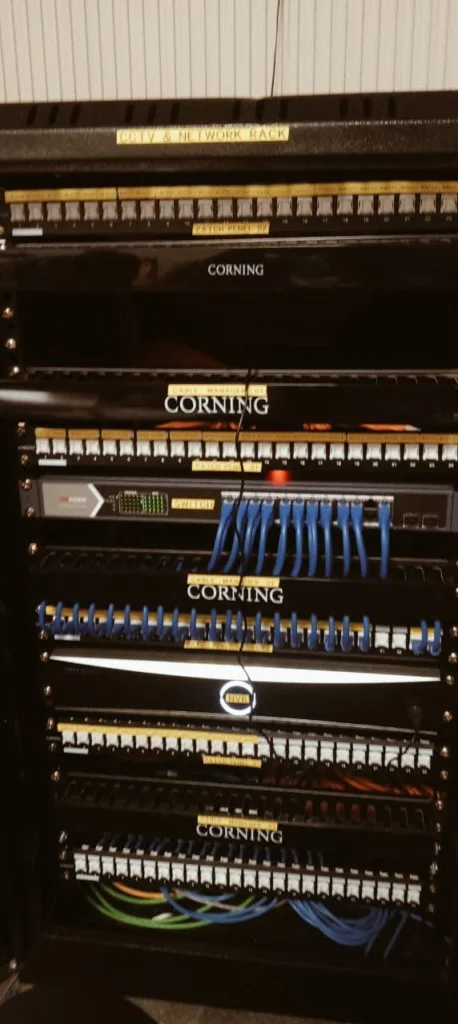
- Every outlet labelled and mapped — no mystery cables
- Fibre backbones between floors and buildings
- Server rooms with the right power and cooling
- Built for cameras, access control and software to run on
What we build
Four layers of the network
Copper to desks, cameras and access points
Links between floors, buildings and blocks
Switching, routing and wireless
Racks, power, cooling and UPS
Specifications
At a glance
- Copper
- Cat6 and Cat6A
- Fibre
- Single-mode and multi-mode backbones
- Termination
- Patch panels, cable managers, labelling and documentation
- Server rooms
- Racks, power distribution, UPS, cooling
Applications
Where it’s used
In depth
Technical information
Detailed guidance on networking & data centre solutions from our survey and installation team.
Overview
Every system we install — cameras, barriers, access control, attendance, parking software — ultimately runs on a network. When that network is improvised, the symptoms show up everywhere else: cameras that drop at night, barriers that stop responding, software that is blamed for a cabling fault.
Structured cabling
Structured cabling is the physical foundation. Done once and documented, it carries data, voice, CCTV and access control for the next ten to fifteen years. Done badly, it is re-pulled within two.
- Cat6 and Cat6A copper for horizontal runs to workstations, cameras and access points
- Single-mode and multi-mode fibre for backbone links between floors, buildings and blocks
- Patch panels, cable managers and labelling so that every outlet maps to a documented port
- Containment: trays, trunking, conduit and fire-stopping at wall and floor penetrations
- Testing and certification: every link tested for continuity, length, crosstalk and attenuation, with results handed over as a report
Active network equipment
- Core and access switches, managed, with the port count and uplink capacity sized to actual load
- PoE and PoE+ switches to power IP cameras, access readers and wireless access points over the same cable that carries their data
- Routers and firewalls with VPN for branch connectivity and remote administration
- VLAN segmentation, so that cameras, guest wifi, office data and access control are kept on separate networks — a security measure, not a luxury
- Wireless: site-surveyed access point placement, seamless roaming, and separate guest and corporate SSIDs
- Network monitoring: alerts when a switch, link or camera goes offline, instead of finding out during an incident
Data centre and server room build
A server room is not a store room with a rack in it. The elements below are what separate equipment that lasts from equipment that fails in its second summer.
| Element | What we deliver |
|---|---|
| Racks and enclosures | Floor-standing and wall-mount racks, sized with growth space, cable management and blanking panels |
| Power | Dedicated distribution, rack PDUs, UPS sized for the load and hold-up time, generator changeover |
| Cooling | Precision or dedicated split cooling, hot and cold aisle arrangement, temperature and humidity monitoring |
| Earthing | Proper earth bar and bonding — the most frequently skipped item, and a common cause of equipment damage |
| Fire safety | Smoke detection and clean-agent suppression, interfaced to the fire alarm system |
| Physical security | Access-controlled door with audit trail, plus a camera covering the rack faces |
| Monitoring | Environmental sensors with alerts for temperature, humidity, water leak and door-open |
Surveillance networks
CCTV is the single heaviest load most of our clients put on their network, and the one most often under-designed. When we plan a camera network we calculate bandwidth per camera at the intended resolution and frame rate, size the storage for the required retention period, put cameras on their own VLAN, and confirm the PoE power budget per switch rather than assuming it.
This is why our CCTV installations keep running after the first month. The camera is the easy part.
Where we work
- Corporate offices and multi-floor head offices
- Factories and industrial units, including harsh and dusty environments
- Hospitals and diagnostic centres
- Universities, colleges and school campuses
- Housing societies, with fibre backbones between gates, blocks and the control room
- Banks and financial institutions
- Warehouses, dry ports and logistics facilities
Our delivery process
- Requirement study: user counts, device counts, applications, growth plan and retention requirements.
- Site survey: building layout, riser positions, distances, power availability and existing infrastructure.
- Design: rack elevations, cable schedules, single-line diagram, IP addressing and VLAN plan.
- Supply: cable, containment, racks, switches, UPS and accessories.
- Installation: containment first, cabling second, termination and dressing third — in that order, never rushed.
- Testing and certification: link-by-link test results and a labelled port schedule.
- Documentation and handover: as-built drawings, IP schedule, credentials handover and administrator training.
- Support: annual maintenance, monitoring and fault call-out.
FAQ
Common questions
Should we use Cat6 or Cat6A?
Cat6 is sufficient for most office workstations and standard IP cameras. Cat6A is worth the extra cost for backbone-adjacent runs, high-density wireless access points and any link you expect to carry 10 Gbps within the cable's lifetime. We usually recommend Cat6A to access points and Cat6 to desks.
Can you work with our existing network equipment?
Yes. We frequently extend or repair existing installations, re-terminate failed links, replace unmanaged switches with managed ones, and document networks that were never documented.
How big should the UPS be?
It depends on whether you need ride-through until the generator starts, or full runtime. For a generator-backed site, five to ten minutes of hold-up is typical. For sites without a generator, we size for the period you need to shut down cleanly.
Can you supply cable and materials to contractors?
Yes. Cable, containment, racks, patch panels and accessories are available on wholesale terms through our wholesale and dealer supply service.
Related
Systems that run on it


Next step
Tell us about your site
Buildings, users and systems — we design the network and quote.
Prefer to talk? +92 42 35786020 · WhatsApp